Title here
Summary here
The Hover Template option allows you to fully customize the content displayed when users hover over gallery thumbnails.
This feature is available only in the Classic Grid gallery inside the Hover Options panel.
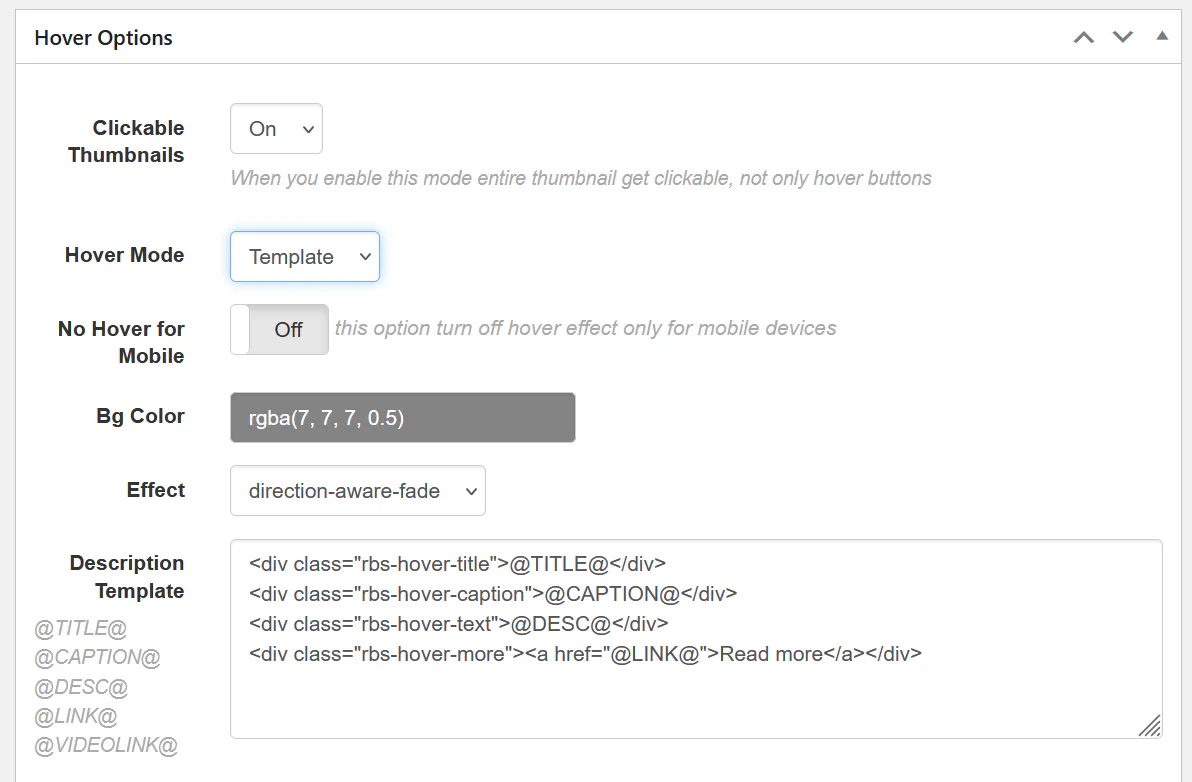
Open your gallery and navigate to:
Options → Hover Options → Hover Mode
Set Hover Mode to:
TemplateThis enables the Hover Template editor, where you can define the layout and content of the hover overlay.
You can insert dynamic content into the hover template using special placeholders.
Available variables:
| Variable | Description |
|---|---|
@TITLE@ |
Image title |
@CAPTION@ |
Image caption |
@DESC@ |
Image description |
@LINK@ |
Custom link assigned to the image |
@VIDEOLINK@ |
Video URL if the item contains video |
Example template used in many galleries:
<div class="rbs-hover-title">@TITLE@</div>
<div class="rbs-hover-caption">@CAPTION@</div>
<div class="rbs-hover-text">@DESC@</div>
<div class="rbs-hover-more">
<a href="@LINK@">Read more</a>
</div>
This layout will display:
Because the hover template uses HTML, you can fully control the structure and styling.
For example, you can:
Example simplified template:
<div class="rbs-hover-title">@TITLE@</div>This will display only the image title on hover.
To customize the appearance, you can use Custom CSS.
Example:
.rbs-hover-title {
    font-size: 18px;
    font-weight: bold;
}

.rbs-hover-caption {
    font-size: 14px;
    opacity: 0.8;
}
This allows you to match the hover design with your website theme.
Hover templates are especially useful for portfolio galleries, product galleries, and image collections where additional information is important.