Albums Navigation
On this page
Fusion galleries support album-based navigation , allowing you to organize multiple galleries into a structured hierarchy. This is especially useful for large collections where you want to group galleries into categories or sections.
Albums help you:
Organize galleries into parent/child structure
Display nested galleries
Control album cover behavior
Customize album icons and appearance
Album Hierarchy#
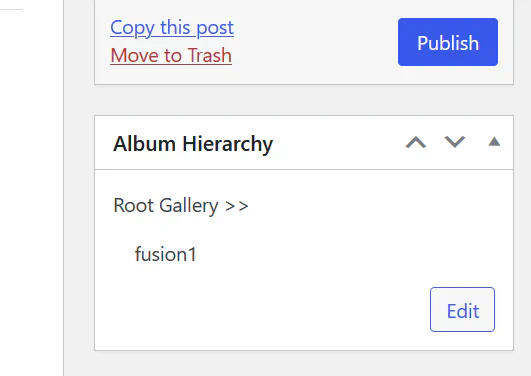
Each gallery can belong to a Root Gallery (parent album). This creates a hierarchical structure.
You can:
Assign a gallery to a root album
Navigate between parent and child galleries
Build multi-level album structures
This is ideal for:
Portfolio categories
Travel galleries by country
Product categories
Event collections
Album Settings (Fusion)#
Go to:
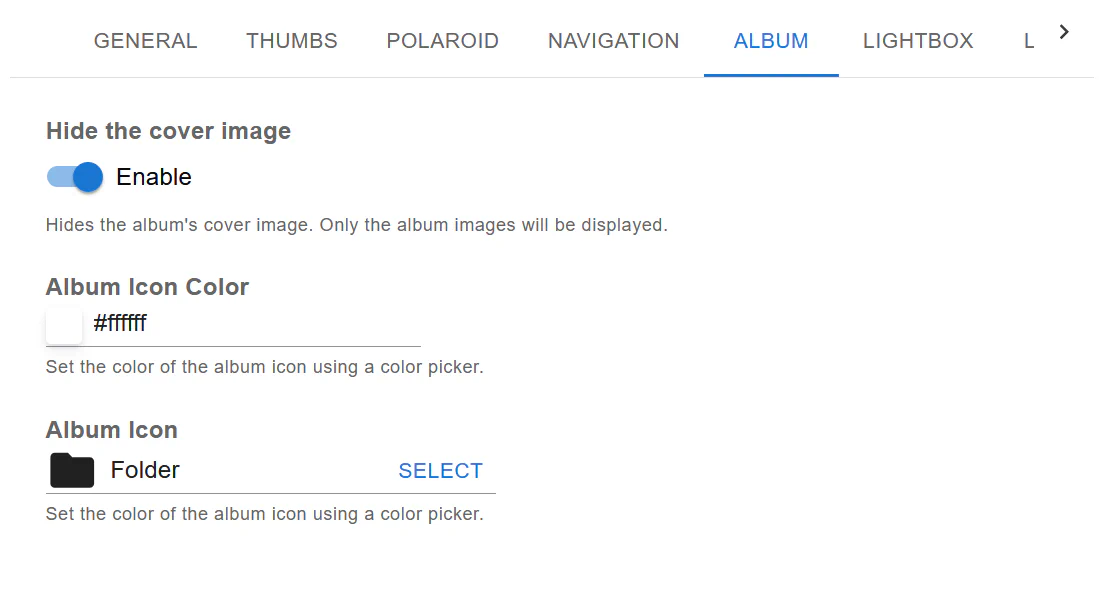
Gallery → ALBUM tab
Available Options#
1. Hide the Cover Image#
Enable this option if you want:
To hide the album cover
Display only gallery images inside the album
This is useful when:
The cover image is not needed
You want a clean grid view
2. Album Icon Color#
You can customize the album icon color using a color picker.
This helps match:
Website branding
Gallery theme
Navigation interface color
3. Album Icon#
Choose the icon style used for albums.
Available options include:
Folder icon
Other predefined icon styles
The icon appears on album thumbnails to visually distinguish them from regular images.
Album Navigation Experience#
When albums are properly configured:
Users can click on album thumbnails
Navigate into nested galleries
Return using breadcrumbs (if enabled)
Use pagination or infinite scroll within albums
Albums work seamlessly with:
Pagination
Infinite Scroll
Breadcrumbs
Navigation Menu
Best Practices#
Use albums for large gallery collections
Keep hierarchy logical and simple
Avoid too many nesting levels
Use consistent album icon styling
Combine albums with breadcrumbs for better UX
Summary#
Fusion Albums Navigation allows you to:
Create structured gallery hierarchies
Control album cover visibility
Customize album icons and colors
Improve navigation for large image collections
With proper album setup, your galleries become easier to browse, cleaner to manage, and more professional in presentation.